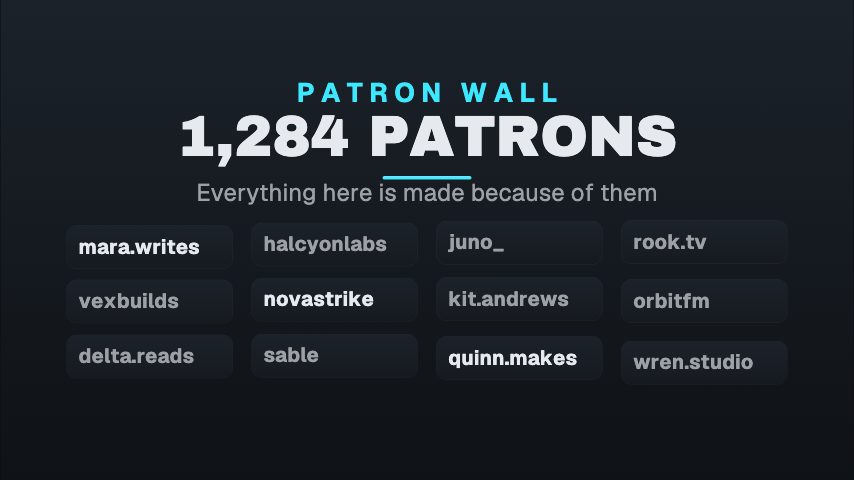
Social proof compressed to one strip: how many people, shown as faces rather than claimed as a figure. The count is authored into the animation as a roll rather than exposed as an editable field, because a number that rolls has to know where it is going. Set it in the source when the real total changes. Best over the opening of a pitch, where the argument is that other people already agreed.
Where it fits
Over the opening of a pitch, where the argument is that other people already agreed.
As a strip under a headline on a landing page loop.
In a course intro, showing the size of the cohort.
Filling it in
One field, the strip colour. The count is authored into the animation as a roll rather than exposed as a field, because a number that rolls has to know where it is going. Set it in the source file when the real total changes, and choose a strip colour that separates from the footage.
Format and timing
Social Proof Strip is built at 640 × 360, a 16:9 landscape frame, the shape of a YouTube video, a stream layout and most editing timelines, and runs 3 seconds at 30 frames per second. It arrives in 0.2 seconds, holds for 2.0 and clears in 0.8, so cue it a beat before the moment it labels. Export it as an MP4 for a timeline or a feed, a GIF where video will not embed, or a MOV with an alpha channel to lay it over footage with nothing behind it. Renders go up to 4K on a paid plan, and Pro opens it free for the first seven days.
What you can edit
Strip colourcolor
Questions about Social Proof Strip
Why can I not type the count?
Because a rolling number needs its destination baked into the keyframes. Exposing it as a field would break the roll. The number is edited in the Lottie source instead.
What number does it show by default?
A creator count in the low thousands. If that does not match your audience, edit the source before exporting rather than publishing a figure you cannot stand behind.